Claude Mods: I Had Too Many Chats, So I Had Claude Build Me Something
I recently discovered I had 713 unarchived Claude Code chats, and only 30 of them were ones I'd actually started. The other 683 were mostly automated runs doing their thing in the background.
I've been using AI coding tools pretty heavily across multiple projects, and I've reached the point where keeping track of what Claude is doing is becoming a job of its own. I couldn't easily tell what was running, what had finished, or what was sitting around waiting for me to answer a question. And with hundreds of automated chats constantly pushing things down the list, finding the projects I actually cared about was getting ridiculous.
So I did what I've been doing a lot lately: I asked Claude to build something to fix it.
Less than an hour later, I had a working mod published on GitHub. It wasn't perfect, but it was useful, and I spent the rest of the time improving it as I used it.
Enter Claude Mods
Claude Code recently added support for mods, small TypeScript modules that can change parts of the app's interface and behavior. You can add panels, commands, status indicators, hooks into tool calls, and other useful little features.
You don't have to spend a bunch of time figuring out how to build one. You describe what you want, let Claude write the code, and see the result right in the app. Mods are still new, so the API will probably change and occasionally break, but that's not a big concern for something like this.
Active Chats
I called my first mod Active Chats, which isn't a particularly exciting name, but it describes exactly what it does.
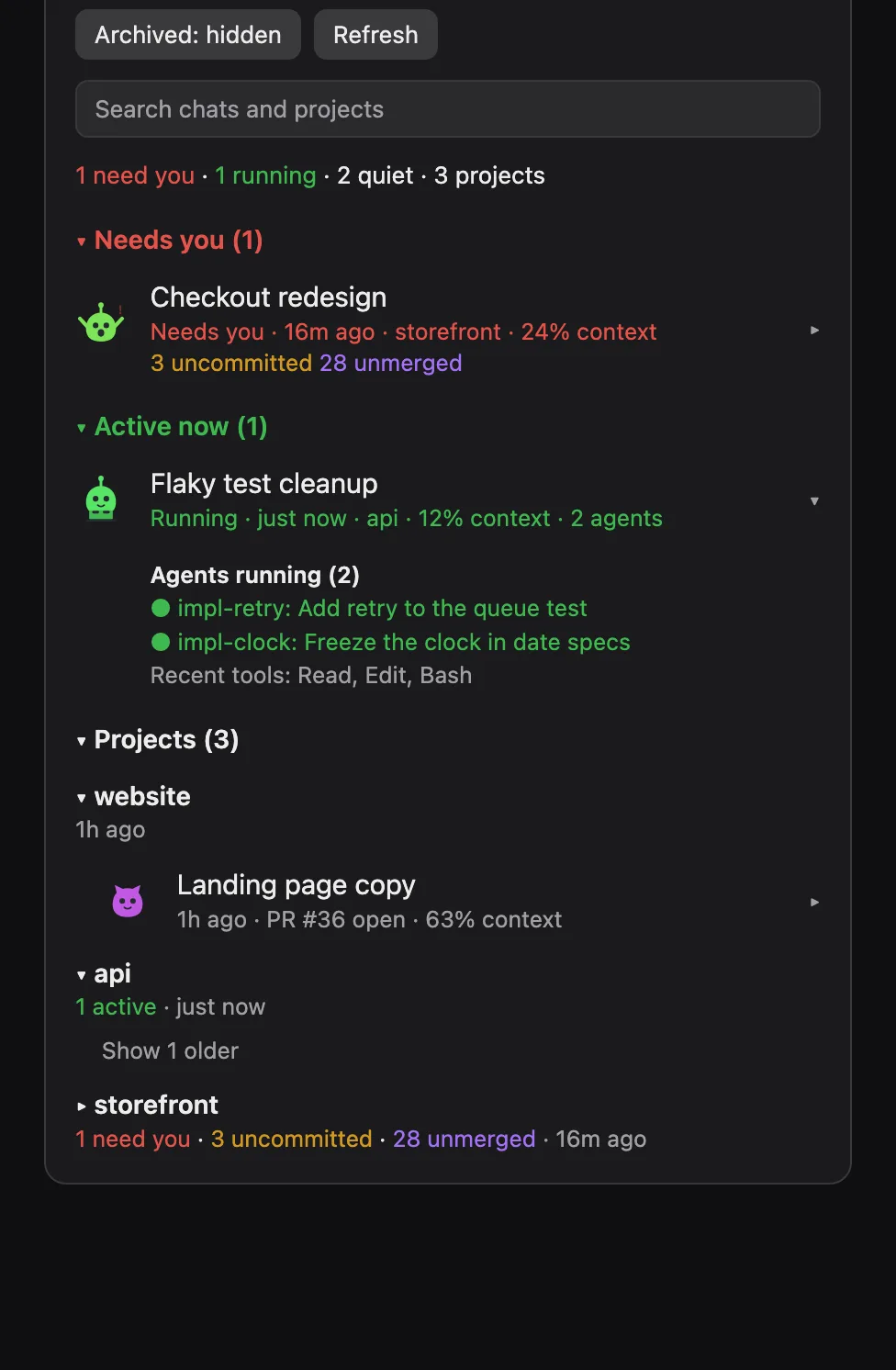
The panel organizes chats into three sections based on what I actually need to know. Needs You shows conversations where Claude appears to be waiting for an answer or decision from me, and keeps those right at the top. Active Now shows chats that are actually doing something, including background agents and tasks that might otherwise appear idle. Projects keeps everything organized so I can find what I'm working on without digging through hundreds of conversations.
I also filtered out scheduled runs, which immediately eliminated 683 chats from my regular view. That alone made a huge difference.
Each chat shows useful details like when it was last active, how much context it's used, whether there's an open PR, and whether there are uncommitted files or unmerged commits. I can expand a chat to see its running agents, background tasks, and recent tool activity, or click directly into the conversation.
I added search and collapsible sections to make navigating everything a little easier. Each chat also has its own animated little creature that hops, types, waves, or otherwise indicates what it's doing. That part wasn't necessary. I like it anyway.
Building It Was the Fun Part
The first version was on GitHub in under an hour, and I didn't start with a detailed specification or component diagrams. At 10:08 that morning, I basically told Claude to build me a mod that listed active chats, let me toggle archived ones, and showed whether anything was waiting on me.
Claude wrote it, loaded it into the app, and I started using it. From there, development was mostly a matter of noticing something I wanted changed and asking Claude to change it.
The first problem was that my chat history was too large. Trying to load everything exceeded a size limit, so Claude adjusted the mod to show the newest 100 chats. That worked well enough to keep going, but I knew I'd eventually want access to everything.
Next I wanted some color coding to make statuses easier to recognize, followed by filtering out all those scheduled runs. Then I decided the rows should be clickable, which unexpectedly broke the colors because the desktop app's buttons weren't respecting custom text colors. I pointed it out, Claude moved the colors to the status line, and we kept going.
As I used it, I kept adding things like context usage, git information, and agent details, and eventually the animated characters. I also asked Claude to come up with three different layout options. It generated mockups, I looked them over, and picked the compact list because I wanted to see as many chats as possible without scrolling all day.
Some things that looked fine in a mockup didn't work quite as well in the actual app. At one point, an expand button had a long label that was squeezing the rest of the row into a tiny space. I sent Claude a screenshot and it fixed the layout. Another version was proudly displaying PR #null on some chats, which was also pretty easy to spot once I actually looked at the thing.
The biggest improvement came when I realized that, despite all the new features, the panel still wasn't quite solving my original problem. I explained that I needed to distinguish between chats that were working, chats that needed my attention, and projects I didn't want disappearing from view. That led to the three-section layout that's there now.
Along the way, Claude also figured out how to read the app's local chat records directly, which let us get past the 100-chat limit. It can now list the entire chat history in about three seconds (if an app update changes those records, it falls back to the newest 100).
There wasn't a grand plan behind any of this. I was using the software, noticing what bothered me, and making changes as I went. Sometimes I'd ask for another improvement while Claude was still working on the previous one. It was a pretty natural process, just with a lot less time spent personally writing and debugging the code.
Claude Wrote the Code. I Still Had to Look at It.
Claude wrote tests along the way, and there are 14 of them now. They didn't catch the cramped rows, weird labels, and visual problems that were obvious the moment I opened the panel.
I still had to actually use the software and decide whether it was doing what I wanted.
Claude can take care of a remarkable amount of the implementation. That doesn't eliminate the need for someone who understands the problem and can recognize when the solution isn't quite right.
I've been writing software for a long time, and I don't particularly miss typing out boilerplate or spending an afternoon tracking down a minor UI issue. I'm much happier spending that time deciding what the software should do, trying it out, and figuring out how to make it better.
The actual code still matters, of course. I just don't feel the need to be the person typing every line of it.
A Few Caveats
This is something I built for my own use, not a polished commercial product, so there are a few limitations worth mentioning.
The Needs You status is an educated guess. Claude doesn't expose a specific flag indicating a conversation is waiting for input, so the mod looks at the end of the transcript for questions or language suggesting a decision is needed. It works reasonably well, but there will be occasional false positives and missed requests.
It's also currently limited to the Claude desktop app on a Mac because it reads local session files. If those files change in a future app update, I'll probably have to make some adjustments. And if an agent crashes or disappears unexpectedly, the mod can keep showing it as active for up to 10 minutes.
All of the transcript and git information is read locally on your computer. The mod doesn't send that information anywhere.
Give It a Try
I've put the code on GitHub at greglose/claude-mods, and I'll likely keep adding more mods as I find other things I'd like to change about the app.
You can install Active Chats from a terminal session with:
/plugin install active-chats --marketplace greglose/claude-modsOr, from the Claude desktop app, click the + next to the prompt box, go to Plugins, choose Add marketplace, enter greglose/claude-mods, and add the plugin.
It's free, open source, and something I built because I needed it. If it's useful to someone else, even better.
What I really enjoy about these AI tools is how much they've reduced the gap between having an idea and actually having working software. A year or two ago, I probably would have tossed something like this onto my list of things to build someday, not because it was particularly difficult, but because I had more important things to spend my time on.
Now I can have an idea, ask Claude to take a first pass at it, and start using it almost immediately. From there, I can keep improving it until it does what I want.
For someone who's spent years building software, that's a nice change. I'm still doing the part I enjoy most, which is solving problems and building useful things. I'm just spending a lot less time on the mechanics of getting there.