Drum Trainer: A Click That Keeps Score
Every drummer is told to practice with a metronome. Fewer are told how to find out whether they are actually with it. You play along, it feels fine, and the only feedback is a vague sense that the groove either sat or didn't.
That gap bothered me for a long time, and it is why I built Drum Trainer: a free, open-source web page that plugs into an electronic kit, puts a pattern on a drum staff, plays a click, and grades every stroke you play against the note that was written.
The ten minutes I kept not getting
My electronic kit lives a few steps from my desk, and most days I have about ten minutes for it. What I wanted was small. Sit down, plug in, play a rock groove for a couple of minutes, and see a number: how close to the click was I, and am I rushing or dragging?
I never got that number. The drum software that came with the kit wanted me to open a full application, pick a kit, route the audio, and then it still only played sounds back at me. The practice apps I tried were games, with notes falling down a screen and a score that told me more about my reflexes than my time. The metronome apps gave me a click and nothing else. By the time any of them were ready I had used up the ten minutes, and I still had no idea whether that backbeat landed where it should.
The honest answer was that nothing simple existed, so I wrote it. The whole thing is one HTML file. You open it, hit the pads, and it tells you how you did.
How it works
The kit's module connects to the computer by USB, the same cable it uses for drum software. Open the page in Chrome or Edge, allow MIDI access when asked, and the page reads each hit as it happens: which pad, how hard, and when, to the millisecond. There is nothing to install and no account. I built and tested it on an Alesis Nitro Pro, but any kit whose module sends MIDI over USB works once its pads are learned, which takes one hit per pad.
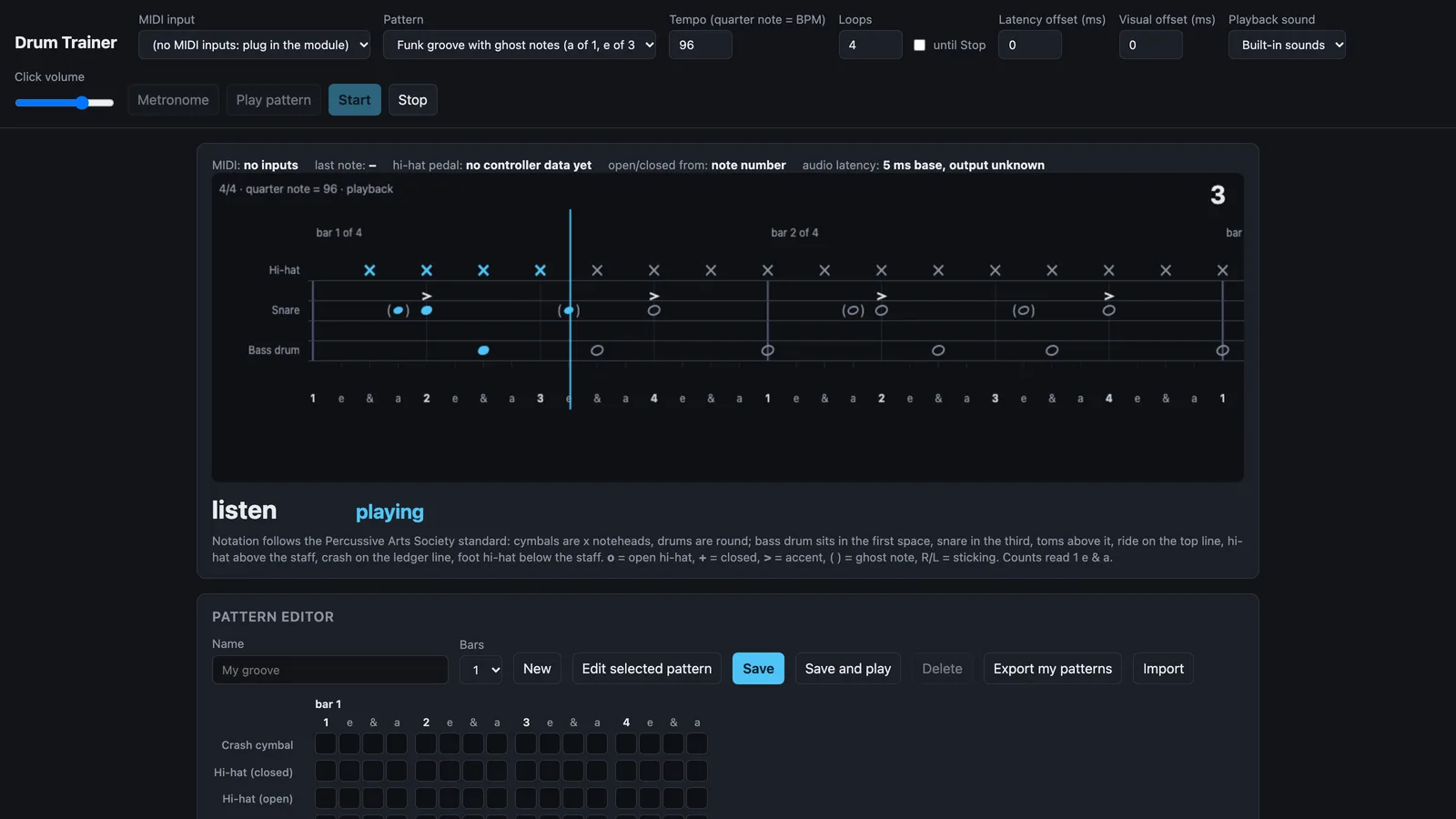
Pick a pattern and a tempo, press Start, and after one bar of count-in the pattern scrolls past a playhead while the click runs. Each note lights up as you hit it: green when you are within twenty milliseconds, shading through yellow and orange as you drift, red when it is missed, and purple when you played a closed hi-hat where an open one was written. A white tick shows exactly where your stroke landed relative to the beat.
No kit nearby? The keyboard stands in. Space is the bass drum, J is the snare, F is the closed hi-hat, so you can try the page before you plug anything in.
Written the way drummers read
The display is a real drum staff, following the Percussive Arts Society's standardized drumset notation that method books use. Bass drum sits in the first space, floor tom in the second, snare in the third, the other toms above it, ride on the top line, hi-hat above the staff and crash on the ledger line. Cymbals are x noteheads and drums are round. Open hi-hats carry an "o", closed ones a "+", accents a ">", and ghost notes sit in parentheses, with R and L stickings and "1 e & a" counts underneath.
If you are learning to read drum music, the trainer doubles as a reader that moves.
What gets graded
Timing is the headline. The end report gives an overall percentage, the count of notes in each tier, from perfect through good, ok and loose to missed, and the one figure most players have never seen about themselves: whether they sit ahead of the click or behind it, and by how many milliseconds. Rushing and dragging stop being accusations and become numbers you can watch change week to week. Mine, for the record, was ahead of the beat on the snare and behind it on the kick, which explained a lot.
Dynamics come next. The report separates the velocity of your accented notes, your plain notes and your ghost notes per voice, so you can see whether the backbeat really is louder than the ghost notes around it or whether everything is coming out at one volume.
Hi-hat articulation is graded too. Open and closed hats share a staff position, so a closed hat played where an open one was written still counts on time, but it is flagged and earns half credit. The trainer reads open or closed either from the note number the module sends or from the pedal's position, whichever the kit provides.
One calibration pass removes the fixed delay of the module and the USB chain from every later score, so the timing you see is yours, not the hardware's.
Hear it, then play it
Play pattern performs the written pattern at the chosen tempo before you try it, either through a built-in synthesized kit or through the module itself, so it comes out of your own drum sounds. A separate Metronome mode is just the click, accented on beat one, for warming up or working on a piece the trainer does not know.
Any mode runs for a set number of bars or until you stop it. In open-ended practice a rolling score for the last four bars shows whether the groove is settling in, which turns out to be the number I look at most. Turn the click volume to zero and you are still graded against the beat, which is a humbling way to find out how much you were leaning on it.
Make your own
Built-in patterns cover rock grooves with eighth and sixteenth hi-hats, open-hat variations, a disco groove, a funk groove with ghost notes, a ride pattern with foot hi-hat, and the rudiments: single stroke roll, double stroke open roll and single paradiddle with stickings.
The pattern editor is where it becomes your practice book. It is a sixteenth-note grid, one row per voice, one to eight bars long. Click a cell for a note, again for an accent, again for a ghost note, and type the stickings underneath. Start from blank or load any pattern, built-ins included, and change it. Saved patterns join the pattern list, loop as a whole, and export to a small file that imports anywhere else, so a teacher can hand a student the week's exercises and see the numbers come back.
Who it is for
Beginners get a tireless, honest click with a picture of where each limb goes. Players chasing speed on rudiments get a tempo ramp with a score at every step. Anyone who has been told they rush gets to see the number, and to watch it come down. Teachers get a way to write out an exercise and know how it was practiced, not just whether.
One practical note for Windows: on Windows 10, and on Windows 11 PCs that don't have Microsoft's new Windows MIDI Services yet (it is rolling out in stages), only one program can hold a MIDI port at a time, so close the kit's own software while the page is open and listen to the module's sounds. With Windows MIDI Services, and on a Mac, both can run together.
Drum Trainer is free, MIT licensed, and keeps everything on your own computer: the pad map, your settings and your patterns never leave the browser. It runs at drum-trainer.cantlosesoftware.com and the source is on GitHub at greglose/drum-trainer. If it gives you back your ten minutes, it has done what I built it for.